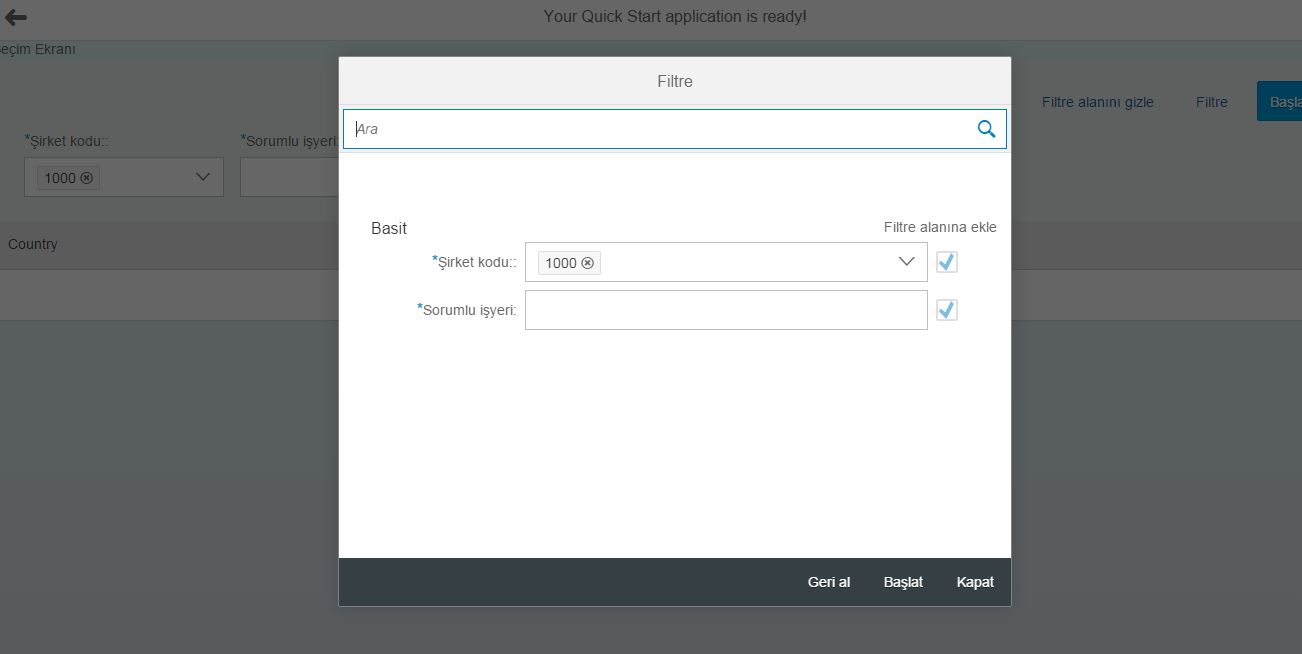
Abap selection screen'larımızı xmlns:fb="sap.ui.comp.filterbar" namespace'nı kullarak hazırlayabilirsiniz.
<fb:FilterBar
reset="onReset"
search="onSearch"
showClearButton="true"
showRestoreButton="true">
<fb:filterItems>
<fb:FilterItem label="Şirket kodu:" mandatory="true" name="A">
<fb:control>
<MultiComboBox id="filterCompany" items="{ path: 'filterWorkorder>/WorkorderFilter', sorter: { path: 'Name' } }" selectedKeys="1000" selectionChange="handleSelectionChange"
selectionFinish="handleSelectionFinish" textAlign="Left" width="200px">
<core:Item key="{filterWorkorder>Company}" text="{filterWorkorder>Company}"/>
</MultiComboBox>
</fb:control>
</fb:FilterItem>
<fb:FilterItem label="Sorumlu işyeri" labelTooltip="Tooltip Example" mandatory="true" name="B">
<fb:control>
<MultiComboBox id="filterResponsive" items="{ path: 'filterWorkorder>/WorkorderFilter', sorter: { path: 'Name' } }" selectedKeys="2312-121-952" selectionChange="handleSelectionChange"
selectionFinish="handleSelectionFinish" textAlign="Left" width="200px">
<core:Item key="{filterWorkorder>Responsive}" text="{filterWorkorder>Responsive}"/>
</MultiComboBox>
</fb:control>
</fb:FilterItem>
</fb:filterItems>
<fb:filterGroupItems>
</fb:filterGroupItems>
</fb:FilterBar>
13 Mart 2016 Pazar
10 Mart 2016 Perşembe
sapui5 page print
Sapui5 page üzerinde print işlemlerini rahatlıkla yapabilirsiniz.Yapmanız gereken window API'lerini çalıştırmak.Print yapmak istediğiniz kayıtları loop ile döndürerek TR/TD combinasyonunda döndürmeniz gerekecek.Print işlemi için basit kod bloğunu aşağıda bulabilirsiniz.
var table = this.getView().byId("__table0").getBinding("items").oList;
//Will give you list of indices after filter & sort
// var filteredIndices = table.getBinding().aIndices;
for(var index=0;index<table.length;index++){
console.log(table[index].Country,table[index].City);
//dataArray.push(aData[filteredIndices[index]]);
}
var body=
"<table id='example' class='display' cellspacing='0' width='100%'>"+
"<thead>"+
"<tr>"+
"<th>Name</th>"+
"<th>Position</th>"+
"<th>Office</th>"+
"<th>Age</th>"+
"<th>Start date</th>"+
"<th>Salary</th>"+
"</tr>"+
"</thead>"+
"<tfoot>"+
"<tr>"+
"<th>Name</th>"+
"<th>Position</th>"+
"<th>Office</th>"+
"<th>Age</th>"+
"<th>Start date</th>"+
"<th>Salary</th>"+
"</tr>"+
"</tfoot>"+
"<tbody>"+
"<tr>"+
"<td>Tiger Nixon</td>"+
"<td>System Architect</td>"+
"<td>Edinburgh</td>"+
"<td>61</td>"+
"<td>2011/04/25</td>"+
"<td>$320,800</td>"+
"</tr>"+
"<tr>"+
"<td>Garrett Winters</td>"+
"<td>Accountant</td>"+
"<td>Tokyo</td>"+
"<td>63</td>"+
"<td>2011/07/25</td>"+
"<td>$170,750</td>"+
"</tr>"+
"</tbody>"+
"</table>";
var size = "width=500px;height=600px";
var wind = window.open("","Print Document",size);
wind.document.write(body);
wind.print();
wind.close();
var table = this.getView().byId("__table0").getBinding("items").oList;
//Will give you list of indices after filter & sort
// var filteredIndices = table.getBinding().aIndices;
for(var index=0;index<table.length;index++){
console.log(table[index].Country,table[index].City);
//dataArray.push(aData[filteredIndices[index]]);
}
var body=
"<table id='example' class='display' cellspacing='0' width='100%'>"+
"<thead>"+
"<tr>"+
"<th>Name</th>"+
"<th>Position</th>"+
"<th>Office</th>"+
"<th>Age</th>"+
"<th>Start date</th>"+
"<th>Salary</th>"+
"</tr>"+
"</thead>"+
"<tfoot>"+
"<tr>"+
"<th>Name</th>"+
"<th>Position</th>"+
"<th>Office</th>"+
"<th>Age</th>"+
"<th>Start date</th>"+
"<th>Salary</th>"+
"</tr>"+
"</tfoot>"+
"<tbody>"+
"<tr>"+
"<td>Tiger Nixon</td>"+
"<td>System Architect</td>"+
"<td>Edinburgh</td>"+
"<td>61</td>"+
"<td>2011/04/25</td>"+
"<td>$320,800</td>"+
"</tr>"+
"<tr>"+
"<td>Garrett Winters</td>"+
"<td>Accountant</td>"+
"<td>Tokyo</td>"+
"<td>63</td>"+
"<td>2011/07/25</td>"+
"<td>$170,750</td>"+
"</tr>"+
"</tbody>"+
"</table>";
var size = "width=500px;height=600px";
var wind = window.open("","Print Document",size);
wind.document.write(body);
wind.print();
wind.close();
9 Mart 2016 Çarşamba
Web service call in the sapui5 page
Sapui5 page içerisinde odata servislerini rahatlıkla kullanabiliyoruz.Ama bazı durumlarda web service'ler ile bağlantı yapmak gerekebilir.Aşağıdaki kod bloğu ile herhangi bir web service'ne bağlanabilirsiniz.
var oModel;
$.ajax({
url: "http://www.webservicex.net/globalweather.asmx/GetCitiesByCountry?CountryName=Turkey",
type: "GET",
dataType: "xml",
//data: "CountryName=Turkey",
contentType: "text/xml",
success: jQuery.proxy(function(data, textStatus) {
// console.log("data" + data);
// NewDataSet
var x2js = new X2JS();
var jsonObj = x2js.xml_str2json(data.documentElement.textContent);
oModel = new sap.ui.model.json.JSONModel(jsonObj);
this.getView().setModel(oModel, "Weather");
}, this),
error: jQuery.proxy(function(data, status, error) {
console.log("hata oluştuERROR");
}, this)
});
var oModel;
$.ajax({
url: "http://www.webservicex.net/globalweather.asmx/GetCitiesByCountry?CountryName=Turkey",
type: "GET",
dataType: "xml",
//data: "CountryName=Turkey",
contentType: "text/xml",
success: jQuery.proxy(function(data, textStatus) {
// console.log("data" + data);
// NewDataSet
var x2js = new X2JS();
var jsonObj = x2js.xml_str2json(data.documentElement.textContent);
oModel = new sap.ui.model.json.JSONModel(jsonObj);
this.getView().setModel(oModel, "Weather");
}, this),
error: jQuery.proxy(function(data, status, error) {
console.log("hata oluştuERROR");
}, this)
});
25 Şubat 2016 Perşembe
TMDIR tablosu
Bazı anlarda ilgili class'ı bulmak gerekebilir.Elinizde sadece method ismi vardır.TMDIR tablosundan class-method ilişkisini bulabilirsiniz.
15 Şubat 2016 Pazartesi
SAP Web IDE 1602 local web ide kurma
SAP Web IDE 1602 local web ide için yapmanız gereken tek şey http://scn.sap.com/docs/DOC-58926 adresinden local web ide klasörü indirmek ve orion.exe çalıştırmak.Yeni kullanıcı oluşturarak local web idenizi kullanabilirsiniz.
http://localhost:8080/webide/index.html default olarak çalışacaktır.İsterseniz 8080 portunu orion.ini dosyasından değiştirebilirsiniz.
11 Şubat 2016 Perşembe
Demo abap program paket
SABAPDEMOS paketinden demo abap programlarını görebilirsiniz.Hana ile ilgili örnek programlar da yeni versiyonlarda gelmiş.
10 Şubat 2016 Çarşamba
New Version of SAP Web IDE Released for Local Installation
New Version of SAP Web IDE Released for Local Installation aşağıdaki link'den indirip kurabilirsiniz.
http://scn.sap.com/docs/DOC-58926
Kaydol:
Kayıtlar (Atom)