No default virus profile active or found. Please check the
offical guide. hatası alıyorsanız,
/IWFND/VIRUS_SCAN işlem kodu ile Virus Scan Switched Off active duruma getirmelisiniz.
23 Ağustos 2016 Salı

15 Temmuz 2016 Cuma
The server is refusing to process the request because the entity has an unsupported format
"The server is refusing to process the request because the entity has an unsupported format" hatasının çözümü için Content-Type = ...;type=entry "type=entry" eklemeniz gerekmekte.
var urlRead = "/createSet";
var headers = {
"X-Requested-With": "XMLHttpRequest",
"Accept": "application/atom+xml,application/atomsvc+xml,application/xml",
"Atom": "http://www.w3.org/2005/Atom",
"Content-Type": "application/atom+xml;type=entry",
"DataServiceVersion": "2.0"
};
var urlRead = "/createSet";
var headers = {
"X-Requested-With": "XMLHttpRequest",
"Accept": "application/atom+xml,application/atomsvc+xml,application/xml",
"Atom": "http://www.w3.org/2005/Atom",
"Content-Type": "application/atom+xml;type=entry",
"DataServiceVersion": "2.0"
};
8 Temmuz 2016 Cuma
sapui5 specific version
Specific Version
Check the available versions with respective maintenance status at https://sapui5.hana.ondemand.com/versionoverview.html and https://openui5.hana.ondemand.com/versionoverview.html.
You can refer to a specific version by using a versioned URL as in the example below:
SAPUI5
|
OpenUI5
|
|---|---|
<script id="sap-ui-bootstrap" type="text/javascript" src="https://sapui5.hana.ondemand.com/1.32.7/resources/sap-ui-core.js" data-sap-ui-theme="sap_bluecrystal" data-sap-ui-libs="sap.m"></script> | <script id="sap-ui-bootstrap" type="text/javascript" src="https://openui5.hana.ondemand.com/1.32.7/resources/sap-ui-core.js" data-sap-ui-theme="sap_bluecrystal" data-sap-ui-libs="sap.m"></script> |
24 Mayıs 2016 Salı
Sap Sorgu taşıma -sq01
SAP sisteminde oluşturduğunuz sorguları farklı sistemlere taşıyabilmek için RSAQR3TR programını kullanabilirsiniz.Aldığınız requesti diğer sistemlere taşıtırsanız aynı sorguyu elde etmiş olursunuz.


26 Nisan 2016 Salı
403 HTTP response - CSRF token validation failed
403 HTTP response - CSRF token validation failed hatasını düzeltmek için
1-sicf-> z*srv servisinizi bulun.Service Data->GUI conf.
~CHECK_CSRF_TOKEN = 0 parametresini ekleyin.

2-Ben karşılaştığım için ekledim.Belki sizde olmayabilir.Odata modelinizin header'ı da açağıdaki gibi olmalı.
var headers = {
"X-Requested-With": "XMLHttpRequest",
"Accept": "application/atom+xml,application/atomsvc+xml,application/xml",
"Content-Type": "application/atom+xml",
"DataServiceVersion": "2.0" };
oModel.setHeaders(headers);
22 Mart 2016 Salı
Error:Please install Android target: "android-23" çözümü
Error:Please install Android target: "android-23" çözümü
1-
 2-Install Android SDK 23
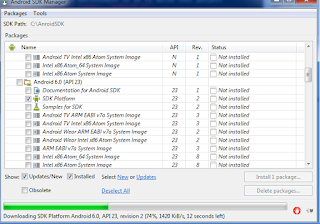
3-Build cordova device OK:

1-


3-Build cordova device OK:

21 Mart 2016 Pazartesi
SWETYPV - Display/Maint. Event Type Linkages debug
Event type için Z'li function tanımladıktan sonra event'ınızın debug'a düşmesi için CL_SWF_EVT_STRATEGY_BOR_FB class'ının PROCESS methodunu kullanabilirsiniz.
Debug mode için = me->m_process_mode = D olmalı

Debug mode için = me->m_process_mode = D olmalı

Kaydol:
Kayıtlar (Atom)